Sender IDs for businesses, LGUs and schools
When a resident gets a disaster advisory, a parent gets an attendance alert or a customer gets an order update, they should see who it's from. This guide is for the organizations sending those messages: what a Sender ID gets you, what it costs, the documents to prepare and how approval works.
Why get your own Sender ID
- Your name as the sender, so people trust and open your messages
- Delivery to every network: Globe, Smart, DITO, Sun and TNT
- Links in messages can be enabled
- The same API and dashboard, whether you send one alert or thousands
Until it's approved, every account can send on the default Sender ID, which reaches Globe and DITO but not Smart, TNT or Sun.
What it costs
There's no monthly fee for Sender IDs today. If we introduce one (₱500 a month), Sender IDs you apply for before then stay free. To apply you need 1 SID token, which comes with every ₱2,500 you top up. A ₱2,500 top-up gives you 5,000 SMS credits plus 1 SID token, so the money goes into messages you'll send anyway. Larger top-ups lower your rate, down to ₱0.35 per SMS. See pricing.
Documents you need
Prepare clear scans or photos before you start. You upload them in the application and e-sign a letter of authorization in the same form.
Choose your type of business to see the documents you need.
Public school or not sure which to pick? Email [email protected].
Documents for a sole proprietor
- DTI registration
- BIR Certificate of Registration (Form 2303)
- Mayor's or business permit
- 2 valid IDs of the business owner
Documents for a corporation (stock or non-stock), OPC or private school
- SEC Certificate of Incorporation
- SEC Articles of Incorporation
- If your corporation files a GIS: certified true copy (CTC) of the latest GIS from the SEC, with the acceptance receipt and certification page. How to get a CTC
- BIR Certificate of Registration (Form 2303)
- Mayor's or business permit
Documents for a partnership
- SEC Certificate of Registration
- Articles of Partnership
- If your partnership files a GIS: certified true copy (CTC) of the latest GIS from the SEC, with the acceptance receipt and certification page. How to get a CTC
- BIR Certificate of Registration (Form 2303)
- Mayor's or business permit
Documents for a cooperative
- CDA Certificate of Registration
- Articles of Cooperation and By-laws
- BIR Certificate of Registration (Form 2303)
- Mayor's or business permit
Documents for an LGU
- Signed certification from your office stating that UNISOFT VENTURES CORPORATION is your authorized partner for registering your Sender ID and for your SMS blasting service. Upload it with your documents. It's separate from the letter you sign in step 4. (UNISOFT VENTURES CORPORATION runs UniSMS.) Sample wording: "This is to certify that UNISOFT VENTURES CORPORATION is the authorized partner of [LGU name] in registering its Sender ID and in providing its SMS blasting service."
GIS certified true copy (CTC)
For corporations (stock or non-stock) and partnerships that file a GIS. Sole proprietors, cooperatives, LGUs and other organizations that don't file a GIS don't need one. Skip to How to apply.
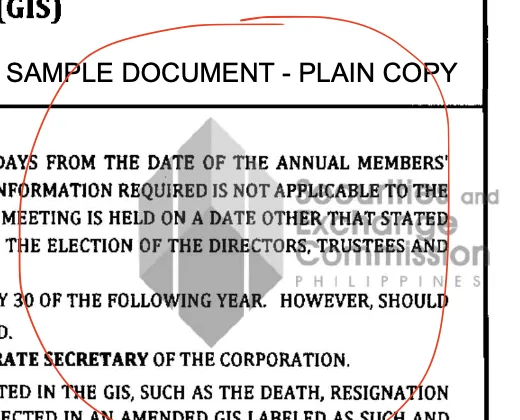
Corporations and partnerships that file a GIS must upload a Certified True Copy (CTC) of their latest General Information Sheet (GIS). The SEC issues a CTC from its own records and certifies that it's a true copy of the GIS on file. The GIS your company filed, downloaded or printed isn't a CTC, and neither is an SEC plain copy. We can't accept either, and your application waits until you send a CTC.
What a complete CTC looks like
A CTC has three parts. Scan and upload all of them.
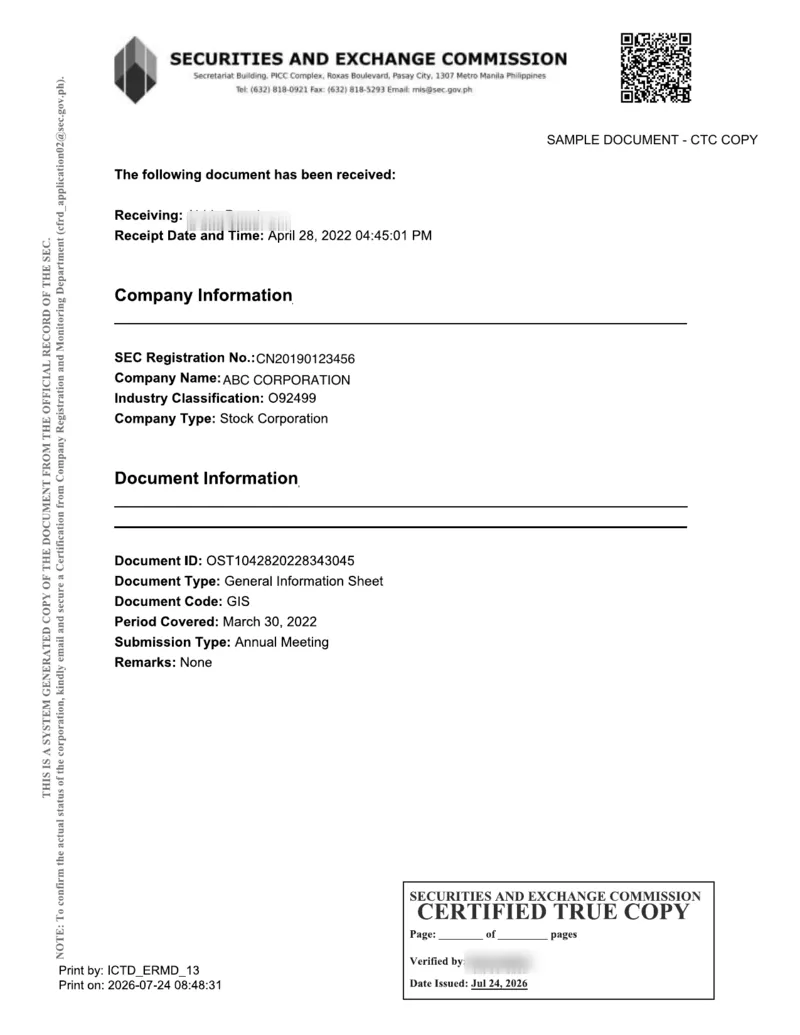 (opens full size in a new tab)
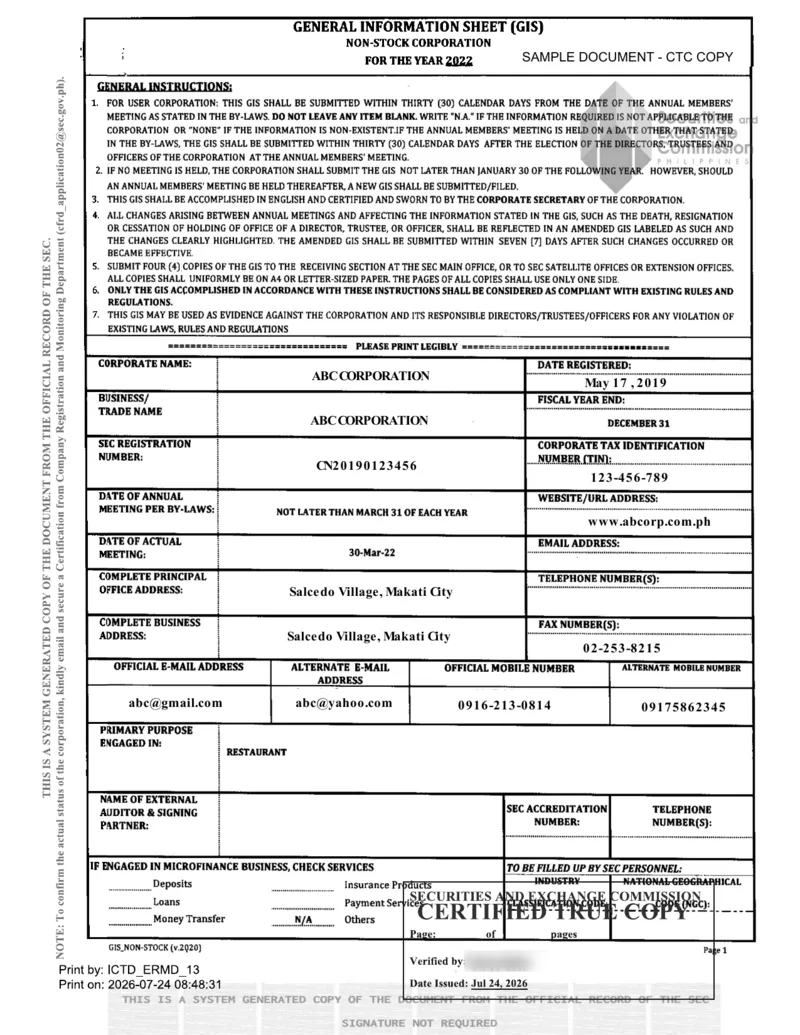 (opens full size in a new tab)
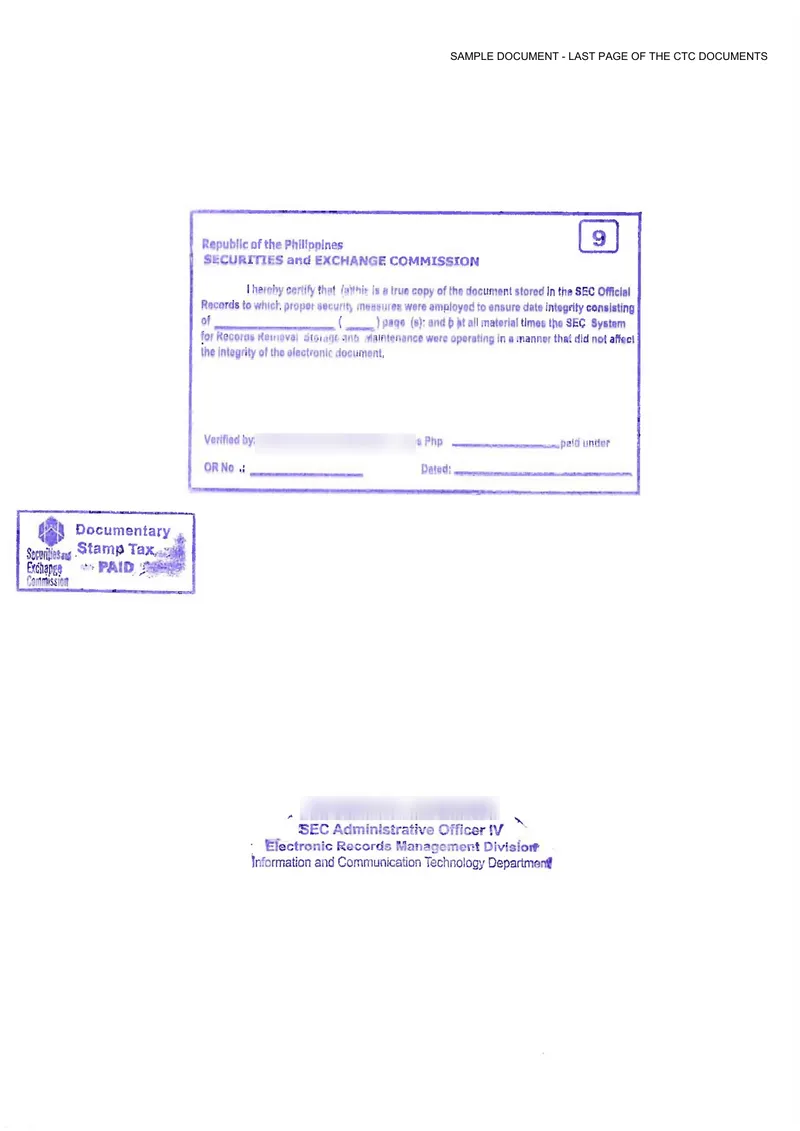 (opens full size in a new tab)
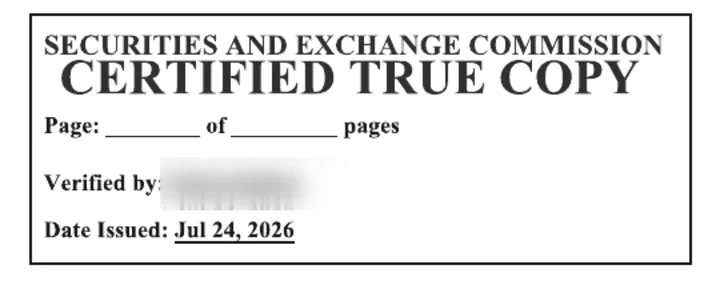
Samples for a fictional company, from the SEC's notice of 24 July 2026 on the CTC format, with the SEC officers' names blurred. Select a page to see it full size.
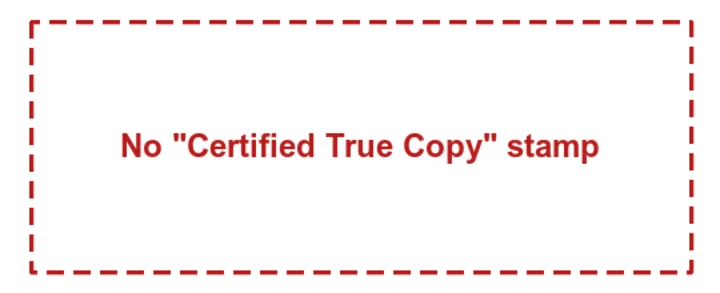
How to tell a CTC from a plain copy
Look for the boxed "Certified True Copy" stamp. The SEC puts it on every page of a CTC, with the page count, the officer who verified it and the date issued. A plain copy doesn't have it.
Order a CTC online
Order it through the SEC Express System (opens in a new tab):
- 1. Go to secexpress.ph and start a request.
- 2. Enter your exact registered company name and, if you have it, your SEC registration number.
- 3. Select the latest GIS filing.
- 4. Choose Certified True Copy (CTC) as the document type, not Plain Copy.
- 5. Pay online with GCash, Maya, a credit card or online banking.
- 6. Wait for courier delivery, usually 3 to 7 working days depending on your location.
Order it before you apply so it doesn't hold up your application. When it arrives, upload a clear scan of every page: the acceptance receipt, the whole GIS and the SEC certification page.
How to apply
- 1. Create an account and top up ₱2,500 or more to get your SID token.
- 2. Fill in the application form: your Sender ID (3 to 11 characters), business details, documents and signature.
- 3. The telcos review it in 7 to 14 business days. Some contact applicants during review. Reply right away to avoid delays.
- 4. Once approved, send with your Sender ID from the dashboard or the SMS API.
Multiple Sender IDs
An organization can have several Sender IDs at no extra charge, for example one per brand, branch or campus. Each application uses 1 SID token.
Banks, financial institutions and brand names
Banks and financial institutions may be asked for additional documents. If the Sender ID you want is a product name, website or brand that differs from your registered business name, we'll ask for documents that prove it's yours.
Postpaid for LGUs and schools
If your procurement can't prepay, postpaid plans are available by application: a fixed rate per SMS, billed at the end of the month, with no upfront top-up. Contact sales with your expected monthly volume.
FAQ
How much does a Sender ID cost?
The Sender ID itself has no monthly or maintenance fee. You need 1 SID token to apply, and you get one with every ₱2,500 you top up. A ₱2,500 top-up gives you 5,000 SMS credits plus 1 SID token.
How long does approval take?
The telcos review every Sender ID, which takes 7 to 14 business days. Some telcos contact applicants during review, so reply quickly to avoid delays.
Can we keep sending while we wait?
Yes. Your account's default Sender ID works right away for Globe and DITO numbers, so you can integrate and test during review.
Can we have more than one Sender ID?
Yes, at no extra charge. Each application uses 1 SID token, for example one Sender ID per brand or per school.
Why was our GIS rejected?
Corporations (stock or non-stock) and partnerships that file a GIS need a certified true copy (CTC) of the latest GIS from the SEC, with a "Certified True Copy" stamp on every page. The copy you filed, downloaded or printed, or an SEC plain copy, isn't accepted. Order a CTC from SEC Express (secexpress.ph); it arrives by courier in about 3 to 7 working days. Sole proprietors, cooperatives, LGUs and other organizations that don't file a GIS don't need one.
Can LGUs and schools pay monthly?
Postpaid plans, billed monthly at a fixed rate per SMS with no upfront top-up, are available by application. Contact sales.
Our Sender ID isn't our registered business name. Is that allowed?
Yes, if you can show it's yours. For a product name, website or brand that differs from your registered name, we'll ask for documents that prove ownership.
Contact us
Questions about your application? Email [email protected]. For postpaid plans, LGU and school procurement or high volumes, email [email protected].